

I built a canvas painting tool to explore how designing with AI still works best when intention comes first.
In light of all the new AI coding tools coming to market, I built a canvas painting tool as a short experiment. On the surface, it was a way to get hands-on with AI-powered coding and design tools and see how far I could take a single idea in a compressed timeframe. Underneath that, it was a test of something I’d been wondering about for a while: what actually happens to design thinking when execution becomes almost effortless?
Unsurprisingly, the fastest path wasn’t the most interesting one, and the most “AI-forward” approach didn’t lead to the most human result. The moments where I slowed down, sketched, and thought about who this tool was for were the moments that gave the project its personality.
Role
Designed, coded, and iterated on this tool end-to-end as a personal project and experiment building with AI tools.
Impact
Served as a demo for my team, showing how AI can amplify intentional design rather than skip the design thinking phase.

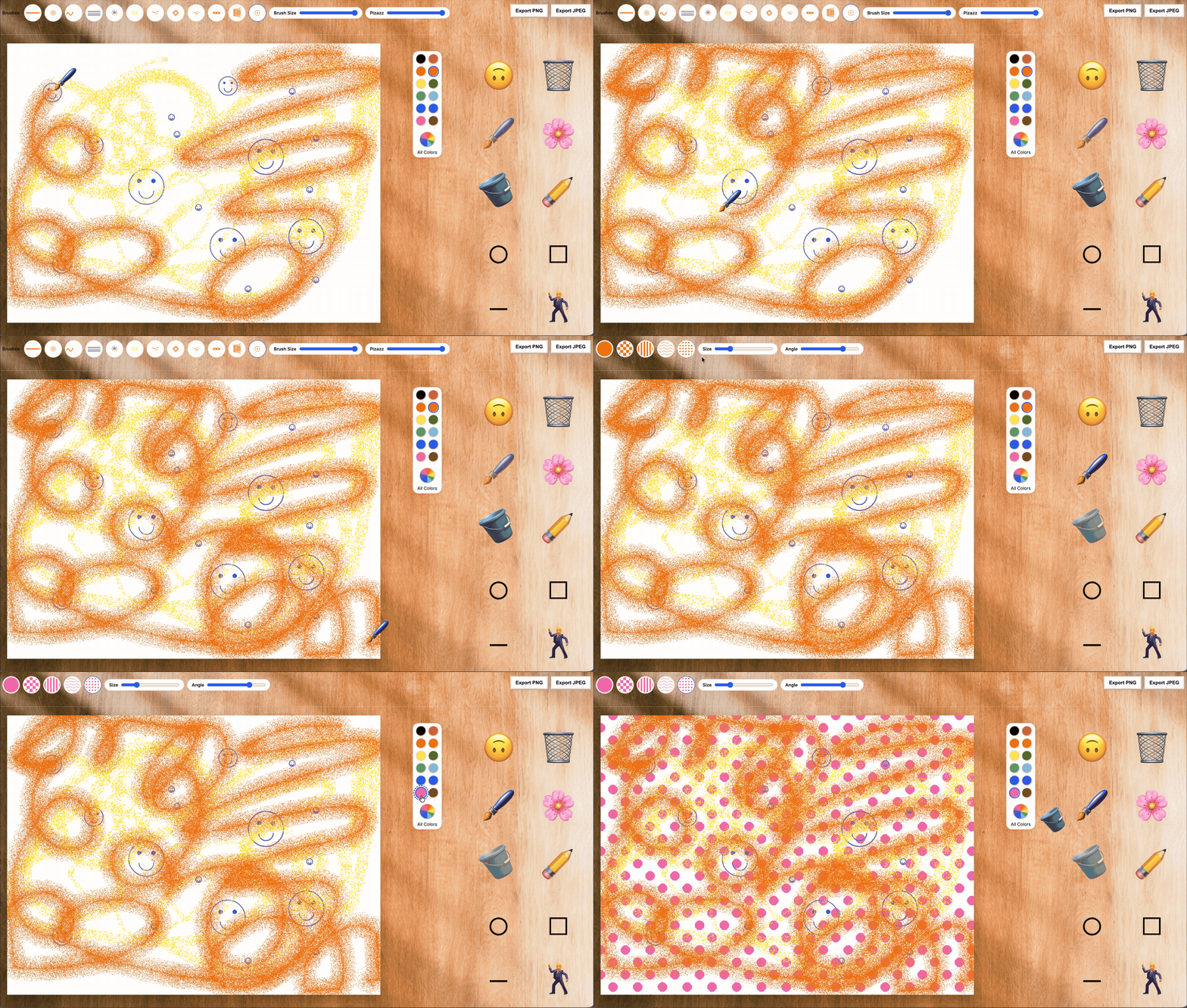
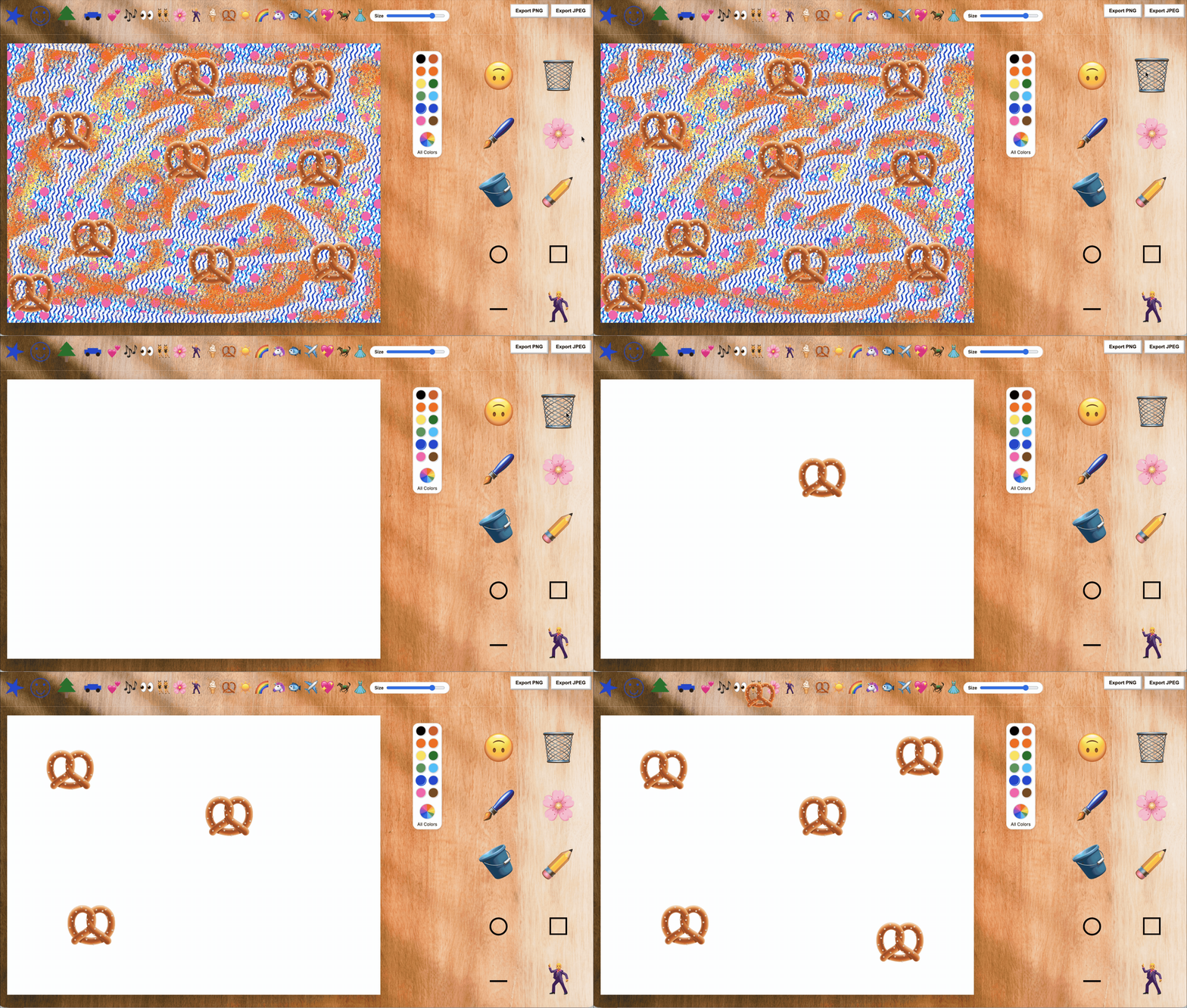
Watch the canvas painting tool in action: brush, bucket fill, eraser, and stamp tools, plus jitter effects and surprising moments that make every interaction playful.

Testing my AI code tools – what can I get with just a prompt?
I began the project the obvious way by prompting the AI coding tool with my vague idea of a retro-style canvas painting tool. I kept the prompt intentionally light and directional, the way someone might when they’re just trying to see what’s possible.

It works, but it's so... generic?
What came back was fast and functional. It looked fine. It worked. And it felt completely generic. The interface didn’t invite exploration or play, and there was nothing about it that hinted at who it was for or why it should exist.
It was a useful reminder that AI is very good at producing something reasonable, even when the idea itself is still fuzzy.
Stepping back to decide what makes this experience unqiue
Realizing that I myself didn't have a clear idea of what I'm building, I spent time reflecting on the experience I was aiming to create. Three principles emerged, which guided every decision after that:
1. Tactile making & tools within arm’s reach
The tool should feel as immediate and intuitive as picking up a marker and making marks on a piece of paper. No buried menus or hidden buttons—everything should be visible, accessible, and ready to interact with.
The goal was to make it easy for anyone to dive in and start creating, whether they’re a kid exploring for the first time or an adult looking for a playful, low-friction way to experiment.

2. A playful interface with room for exploration and delight
The interface should be minimal and approachable, but still full of surprises. Inspired by KidPix, the tool reveals itself through trial and error: actions sometimes behave slightly differently, and discovery comes from interacting, testing, and playing.
This makes the act of creating joyful and encourages curiosity—whether you’re learning by accident or intentionally exploring the possibilities.

3. Nostalgic digital skeuomorphism: human and familiar
I wanted the interface to feel like real-world art making. Tools should have a clear, tangible connection to their effect on the canvas, so that cause and effect is obvious.
This tactile, slightly nostalgic quality makes the experience feel human and satisfying, and gives both kids and adults a sense that they’re really “holding” and shaping their tools as they create. I felt that native iOS emojis would be the fastest way to achieve this look to start.

Back to sketching in Figma
With the pillars in place, I returned to lo-fi sketches. This wasn’t about polish—it was about turning principles into tangible decisions and seeing how they might actually feel in use.
Which tools should be front and center? How should interactions surprise the user without confusing them? How could the interface encourage play while still being understandable? What functionality should I build first and how should I sequence the build?
These sketches let me experiment freely, iterate quickly, and refine the vision before returning to the code. By exploring these questions visually, I could test ideas, uncover unexpected interactions, and make sure the tool felt intuitive, playful, and human from the very first click.

Quick gut check with a high fidelity sketch
How did the emojis feel as tools in hand? What is the approximately right sizing and position on the new "desk" background?

Building with confidence
With sketches and clear principles in hand, I returned to AI-assisted coding and design. This time, the process was less about prompting for a complete tool and more about building it step by step, iteratively.
I started by prompting for the overall layout and sequencing—deciding which areas should appear first, how the canvas should be framed, and where the primary tools would live. From there, I refined the positions of individual elements, defined UI components like emoji buttons, and adjusted cursor behaviors to feel playful and responsive. Page resizing introduced unexpected challenges and occasional surprises from the AI, which became opportunities to test new interactions and tweak functionality.
This was truly a process of trial and error, only possible because I had a crystal-clear vision for the tool’s intent. Every tweak and iteration built on the principles I had defined earlier, letting the final result feel human, specific, and inviting. The tool now encourages exploration and play, while still leaving room for delightful surprises—showing that AI amplifies intentional design, rather than replacing it.
My takeaways:
This project reminded me that having a clear vision is what makes experimentation meaningful. AI can generate outcomes quickly, but it’s the intent, curiosity, and thoughtful choices that give a tool personality and purpose.
Like always, slowing down to define principles, sketch, and ask questions, about sequence, layout, and playful interactions, was what made the final result feel human, approachable, and enjoyable for anyone using it. The messy, iterative process wasn’t a delay; it was the part that made speed and AI assistance truly worthwhile.
This is just the beginning of my work with AI coding tools like Cursor, Loveable, and Figma Make. I’m excited to continue experimenting and building, carrying the lessons from this project into the next set of playful, human-centered tools.
AI as the designer

Design implemented by AI
🩷 Thanks for reading! This is a detailed project, drop me a line if you'd like to hear more about it.